언리얼에서 제공하는 GAS(GameAbilitySystem)에 대해 공부해보려고 한다.
추가로 C++ 연동이 불편한 Visual Studio 대신 Rider라는 IDE를 많이 쓰는 추세여서 Rider를 새로 설치하였다.

플러그인을 설치하면 오른쪽에 AI를 사용할 수 있다.

언리얼 에디터에서 Gameplay Abilities 플러그인을 추가한다.
// CharacterBase.h

#pragma once

#include "CoreMinimal.h"
#include "GameFramework/Character.h"
#include "AbilitySystemInterface.h"
#include "AbilitySystemComponent.h"
#include "CharacterBase.generated.h"

UCLASS()
class GAS_RPG_API ACharacterBase : public ACharacter, public IAbilitySystemInterface
{
	GENERATED_BODY()

public:

	ACharacterBase();

	UPROPERTY(VisibleAnywhere, BlueprintReadOnly, Category = "AbilitySystem")
	class UAbilitySystemComponent* AbilitySystemComponent;

protected:

	virtual void BeginPlay() override;

	virtual void PossessedBy(AController* NewController) override;

	virtual void OnRep_PlayerState() override;

	UPROPERTY(EditAnywhere, BlueprintReadWrite, Category = "AbilitySystem")
	EGameplayEffectReplicationMode AscReplicationMode = EGameplayEffectReplicationMode::Mixed;

public:

	virtual void Tick(float DeltaTime) override;

	virtual void SetupPlayerInputComponent(class UInputComponent* PlayerInputComponent) override;

	virtual UAbilitySystemComponent* GetAbilitySystemComponent() const override;

};
// CharacterBase.cpp

#include "CharacterBase.h"

#include "Components/CapsuleComponent.h"
#include "GameFramework/CharacterMovementComponent.h"

ACharacterBase::ACharacterBase()
{
	PrimaryActorTick.bCanEverTick = true;

	// Add the Ability System Component
	AbilitySystemComponent = CreateDefaultSubobject<UAbilitySystemComponent>(TEXT("AbilitySystemComponent"));
	AbilitySystemComponent->SetIsReplicated(true);
	AbilitySystemComponent->SetReplicationMode(AscReplicationMode);

	GetCapsuleComponent()->SetCapsuleSize(35.f, 90.f);

	bUseControllerRotationPitch = false;
	bUseControllerRotationYaw = false;
	bUseControllerRotationRoll = false;

	GetCharacterMovement()->bOrientRotationToMovement = true;
	GetCharacterMovement()->RotationRate = FRotator(0.f, 500.f, 0.f);

	GetCharacterMovement()->JumpZVelocity = 500.f;
	GetCharacterMovement()->AirControl = 0.35f;
	GetCharacterMovement()->MaxWalkSpeed = 500.f;
	GetCharacterMovement()->MinAnalogWalkSpeed = 20.f;
	GetCharacterMovement()->BrakingDecelerationWalking = 2000.f;
	GetCharacterMovement()->BrakingDecelerationFalling = 1500.f;
}

void ACharacterBase::BeginPlay()
{
	Super::BeginPlay();

}

void ACharacterBase::PossessedBy(AController* NewController)
{
	Super::PossessedBy(NewController);

	if (AbilitySystemComponent)
	{
		AbilitySystemComponent->InitAbilityActorInfo(this, this);
	}
}

void ACharacterBase::OnRep_PlayerState()
{
	Super::OnRep_PlayerState();

	if (AbilitySystemComponent)
	{
		AbilitySystemComponent->InitAbilityActorInfo(this, this);
	}
}

void ACharacterBase::Tick(float DeltaTime)
{
	Super::Tick(DeltaTime);

}

void ACharacterBase::SetupPlayerInputComponent(UInputComponent* PlayerInputComponent)
{
	Super::SetupPlayerInputComponent(PlayerInputComponent);

}

UAbilitySystemComponent* ACharacterBase::GetAbilitySystemComponent() const
{
	return AbilitySystemComponent;
}
간단히 캐릭터 C++파일을 만들고 적용한다.
AbilitySystemComponent를 UPROPERTY로 설정하였다.

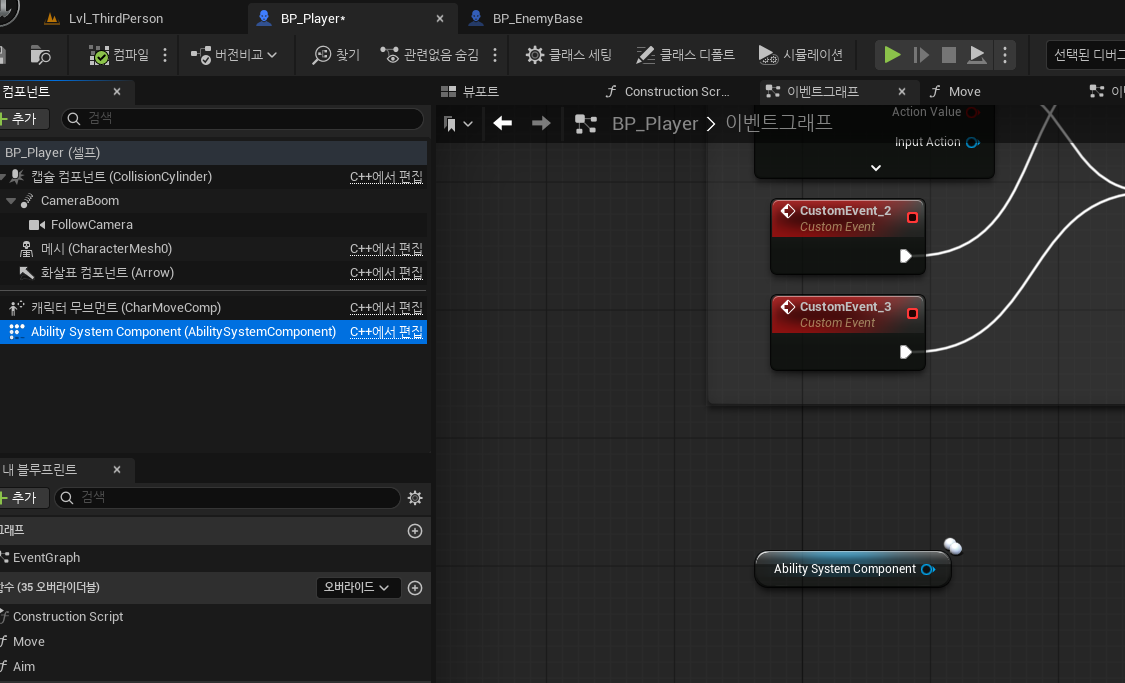
Ability System Component가 에디터에 추가된 것을 볼 수 있다.
Rider IDE를 써보니 Visual Studio보다 자동완성기능이 빠르고 정확하고 AI기능도 매우 쓰기 편했다.
'언리얼 - C++ 프로젝트' 카테고리의 다른 글
| GAS_System (3) 캐릭터 상태 및 능력 UI (0) | 2025.10.20 |
|---|---|
| GAS_System (2) 대시 능력 구현 (0) | 2025.10.19 |
| Inventory System (9) 아이템 설명창 (1) | 2025.08.07 |
| Inventory System (8) 아이템 드랍 (0) | 2025.08.05 |
| Inventory System (7) 아이템 나누기 (0) | 2025.08.05 |